VXLANネットワーク構築例 ユニキャスト編
Posted on 2014/03/18(Tue) 00:49 in technical
さまりー
openvswitch-2.0.0を使ってUnicast VXLANネットワークを構築する際のサンプルコンフィグレーション。
環境構成には、GNS3とVirtualBoxを使用します。
また、本記事は以前動かなかったなどと言っておきながら、動いたログを用意していなかったことに対する懺悔とも言えるものである。
Ubuntu-13.10とopenvswitch-1.10.2でVXLANが動かない件: https://www.ainoniwa.net/pelican/wp/1147
環境構成図
図のようなGNS3+VirtualBox環境をもとに、VXLANネットワークを作ります
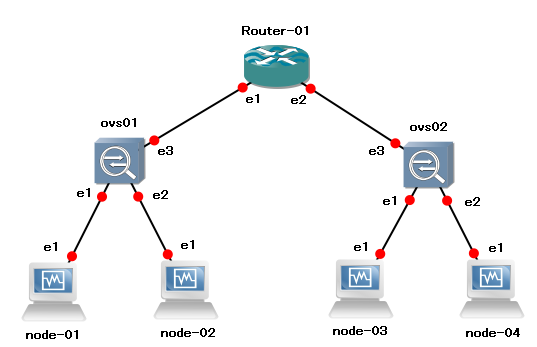
登場人物:
Router-01 : BSDRP 1.4 on VirtualBox
node-01 : BSDRP 1.4 on VirtualBox
node-02 : BSDRP 1.4 on VirtualBox
node-03 : BSDRP 1.4 on VirtualBox
node-04 : BSDRP 1.4 on VirtualBox
ovs01 : Ubuntu-12.04.3 + openvswitch-2.0.0 on VirtualBox
ovs02 : Ubuntu-12.04.3 + openvswitch-2.0.0 on VirtualBox
構築予定図
図のようなVXLANネットワークを構築しましょー
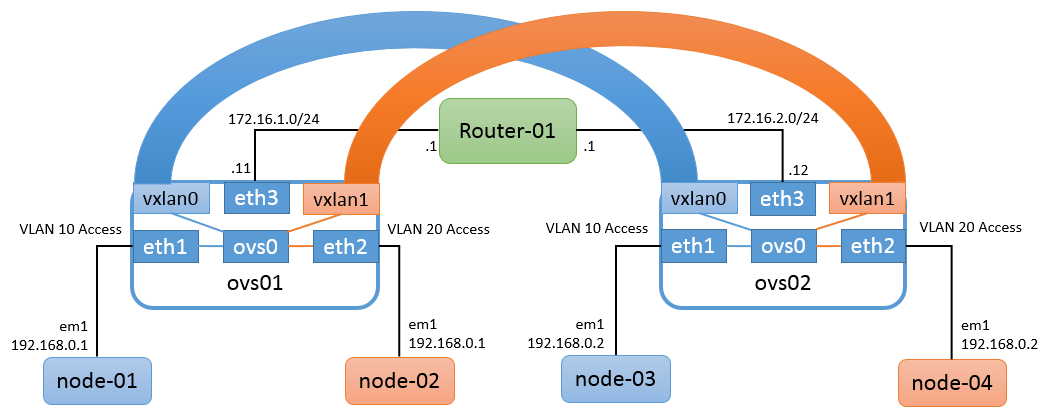
事前準備
openvswitch-2.0.0を入れておきましょう。
Configuration
router-01
ifconfig em1 172.16.1.1/24 up
ifconfig em2 172.16.2.1/24 up
node-01
ifconfig em1 192.168.0.1/24 up
node-02
ifconfig em1 192.168.0.1/24 up
node-03
ifconfig em1 192.168.0.2/24 up
node-04
ifconfig em1 192.168.0.2/24 up
ovs01
面倒なのでrootで作業します。:
for i in `seq 0 5`; do ip link set up eth${i}; done
for br in `ovs-vsctl list-br`; do ovs-vsctl del-br ${br}; done
ovs-vsctl add-br ovs0
ovs-vsctl add-port ovs0 eth1 tag=10
ovs-vsctl add-port ovs0 eth2 tag=20
ovs-vsctl add-port ovs0 vxlan0 tag=10 -- set interface vxlan0 type=vxlan options:key=10 options:remote_ip=172.16.2.12
ovs-vsctl add-port ovs0 vxlan1 tag=20 -- set interface vxlan1 type=vxlan options:key=20 options:remote_ip=172.16.2.12
ip addr flush dev eth3
ip addr add 172.16.1.11/24 dev eth3
ip route add 172.16.2.0/24 via 172.16.1.1
ovs02
for i in `seq 0 5`; do ip link set up eth${i}; done
for br in `ovs-vsctl list-br`; do ovs-vsctl del-br ${br}; done
ovs-vsctl add-br ovs0
ovs-vsctl add-port ovs0 eth1 tag=10
ovs-vsctl add-port ovs0 eth2 tag=20
ovs-vsctl add-port ovs0 vxlan0 tag=10 -- set interface vxlan0 type=vxlan options:key=10 options:remote_ip=172.16.1.11
ovs-vsctl add-port ovs0 vxlan1 tag=20 -- set interface vxlan1 type=vxlan options:key=20 options:remote_ip=172.16.1.11
ip addr flush dev eth3
ip addr add 172.16.2.12/24 dev eth3
ip route add 172.16.1.0/24 via 172.16.2.1
設定確認
ovs01
# ovs-vsctl show
91158e4f-1bd0-4f50-b6c9-32f669ee0dee
    Bridge "ovs0"
        Port "vxlan0"
            tag: 10
            Interface "vxlan0"
                type: vxlan
                options: {key="10", remote_ip="172.16.2.12"}
        Port "ovs0"
            Interface "ovs0"
                type: internal
        Port "eth1"
            tag: 10
            Interface "eth1"
        Port "vxlan1"
            tag: 20
            Interface "vxlan1"
                type: vxlan
                options: {key="20", remote_ip="172.16.2.12"}
        Port "eth2"
            tag: 20
            Interface "eth2"
    ovs_version: "2.0.0"
# ovs-vsctl list interface vxlan0 | grep -v -e "\[\]" -e "\{\}"
_uuid               : f7220f60-98b0-4415-ba9c-8853ae490b89
admin_state         : up
ifindex             : 0
ingress_policing_burst: 0
ingress_policing_rate: 0
link_resets         : 0
link_state          : up
mac_in_use          : "4e:89:6e:79:ae:d0"
name                : "vxlan0"
ofport              : 3
options             : {key="10", remote_ip="172.16.2.12"}
statistics          : {collisions=0, rx_bytes=0, rx_crc_err=0, rx_dropped=0, rx_errors=0, rx_frame_err=0, rx_over_err=0, rx_packets=0, tx_bytes=0, tx_dropped=0, tx_errors=0, tx_packets=0}
status              : {tunnel_egress_iface="eth1", tunnel_egress_iface_carrier=up}
type                : vxlan
# ovs-vsctl list interface vxlan1 | grep -v -e "\[\]" -e "\{\}"
_uuid               : 9d44cad4-afbe-4c75-9560-f4491bc50fb6
admin_state         : up
ifindex             : 0
ingress_policing_burst: 0
ingress_policing_rate: 0
link_resets         : 0
link_state          : up
mac_in_use          : "4e:80:02:bf:c8:ae"
name                : "vxlan1"
ofport              : 4
options             : {key="20", remote_ip="172.16.2.12"}
statistics          : {collisions=0, rx_bytes=0, rx_crc_err=0, rx_dropped=0, rx_errors=0, rx_frame_err=0, rx_over_err=0, rx_packets=0, tx_bytes=0, tx_dropped=0, tx_errors=0, tx_packets=0}
status              : {tunnel_egress_iface="eth1", tunnel_egress_iface_carrier=up}
type                : vxlan
ovs02
# ovs-vsctl show
91158e4f-1bd0-4f50-b6c9-32f669ee0dee
    Bridge "ovs0"
        Port "ovs0"
            Interface "ovs0"
                type: internal
        Port "eth2"
            tag: 20
            Interface "eth2"
        Port "eth1"
            tag: 10
            Interface "eth1"
        Port "vxlan1"
            tag: 20
            Interface "vxlan1"
                type: vxlan
                options: {key="20", remote_ip="172.16.1.11"}
        Port "vxlan0"
            tag: 10
            Interface "vxlan0"
                type: vxlan
                options: {key="10", remote_ip="172.16.1.11"}
    ovs_version: "2.0.0"
# ovs-vsctl list interface vxlan0 | grep -v -e "\[\]" -e "\{\}"
_uuid               : 12f8d480-391b-4caa-b33c-21c8efa09652
admin_state         : up
ifindex             : 0
ingress_policing_burst: 0
ingress_policing_rate: 0
link_resets         : 0
link_state          : up
mac_in_use          : "06:b5:dc:96:19:f2"
name                : "vxlan0"
ofport              : 3
options             : {key="10", remote_ip="172.16.1.11"}
statistics          : {collisions=0, rx_bytes=0, rx_crc_err=0, rx_dropped=0, rx_errors=0, rx_frame_err=0, rx_over_err=0, rx_packets=0, tx_bytes=0, tx_dropped=0, tx_errors=0, tx_packets=0}
status              : {tunnel_egress_iface="eth1", tunnel_egress_iface_carrier=up}
type                : vxlan
# ovs-vsctl list interface vxlan1 | grep -v -e "\[\]" -e "\{\}"
_uuid               : 0707adc6-7a57-4f5b-927c-b03070a2278a
admin_state         : up
ifindex             : 0
ingress_policing_burst: 0
ingress_policing_rate: 0
link_resets         : 0
link_state          : up
mac_in_use          : "fe:36:34:fc:a9:fa"
name                : "vxlan1"
ofport              : 4
options             : {key="20", remote_ip="172.16.1.11"}
statistics          : {collisions=0, rx_bytes=0, rx_crc_err=0, rx_dropped=0, rx_errors=0, rx_frame_err=0, rx_over_err=0, rx_packets=0, tx_bytes=0, tx_dropped=0, tx_errors=0, tx_packets=0}
status              : {tunnel_egress_iface="eth1", tunnel_egress_iface_carrier=up}
type                : vxlan
動作確認
router-01
# tcpdump -i em1 -s 65535 -w /tmp/unicast-vxlan_router-01_em1.pcap
node-01
# ping -c 20 192.168.0.2
PING 192.168.0.2 (192.168.0.2): 56 data bytes
64 bytes from 192.168.0.2: icmp_seq=0 ttl=64 time=8.729 ms
64 bytes from 192.168.0.2: icmp_seq=1 ttl=64 time=2.460 ms
64 bytes from 192.168.0.2: icmp_seq=2 ttl=64 time=2.499 ms
64 bytes from 192.168.0.2: icmp_seq=3 ttl=64 time=2.303 ms
64 bytes from 192.168.0.2: icmp_seq=4 ttl=64 time=2.325 ms
64 bytes from 192.168.0.2: icmp_seq=5 ttl=64 time=2.109 ms
64 bytes from 192.168.0.2: icmp_seq=6 ttl=64 time=2.893 ms
64 bytes from 192.168.0.2: icmp_seq=7 ttl=64 time=2.486 ms
64 bytes from 192.168.0.2: icmp_seq=8 ttl=64 time=2.745 ms
64 bytes from 192.168.0.2: icmp_seq=9 ttl=64 time=1.737 ms
64 bytes from 192.168.0.2: icmp_seq=10 ttl=64 time=2.392 ms
64 bytes from 192.168.0.2: icmp_seq=11 ttl=64 time=2.690 ms
64 bytes from 192.168.0.2: icmp_seq=12 ttl=64 time=2.410 ms
64 bytes from 192.168.0.2: icmp_seq=13 ttl=64 time=2.981 ms
64 bytes from 192.168.0.2: icmp_seq=14 ttl=64 time=2.719 ms
64 bytes from 192.168.0.2: icmp_seq=15 ttl=64 time=2.741 ms
64 bytes from 192.168.0.2: icmp_seq=16 ttl=64 time=2.240 ms
64 bytes from 192.168.0.2: icmp_seq=17 ttl=64 time=2.703 ms
64 bytes from 192.168.0.2: icmp_seq=18 ttl=64 time=2.480 ms
64 bytes from 192.168.0.2: icmp_seq=19 ttl=64 time=2.440 ms

--- 192.168.0.2 ping statistics ---
20 packets transmitted, 20 packets received, 0.0% packet loss
round-trip min/avg/max/stddev = 1.737/2.804/8.729/1.387 ms
node-02
# ping -c 20 192.168.0.2
PING 192.168.0.2 (192.168.0.2): 56 data bytes
64 bytes from 192.168.0.2: icmp_seq=0 ttl=64 time=10.580 ms
64 bytes from 192.168.0.2: icmp_seq=1 ttl=64 time=1.911 ms
64 bytes from 192.168.0.2: icmp_seq=2 ttl=64 time=2.317 ms
64 bytes from 192.168.0.2: icmp_seq=3 ttl=64 time=2.543 ms
64 bytes from 192.168.0.2: icmp_seq=4 ttl=64 time=2.093 ms
64 bytes from 192.168.0.2: icmp_seq=5 ttl=64 time=2.368 ms
64 bytes from 192.168.0.2: icmp_seq=6 ttl=64 time=2.502 ms
64 bytes from 192.168.0.2: icmp_seq=7 ttl=64 time=2.370 ms
64 bytes from 192.168.0.2: icmp_seq=8 ttl=64 time=2.652 ms
64 bytes from 192.168.0.2: icmp_seq=9 ttl=64 time=2.184 ms
64 bytes from 192.168.0.2: icmp_seq=10 ttl=64 time=2.200 ms
64 bytes from 192.168.0.2: icmp_seq=11 ttl=64 time=2.544 ms
64 bytes from 192.168.0.2: icmp_seq=12 ttl=64 time=3.041 ms
64 bytes from 192.168.0.2: icmp_seq=13 ttl=64 time=2.397 ms
64 bytes from 192.168.0.2: icmp_seq=14 ttl=64 time=2.488 ms
64 bytes from 192.168.0.2: icmp_seq=15 ttl=64 time=2.443 ms
64 bytes from 192.168.0.2: icmp_seq=16 ttl=64 time=2.059 ms
64 bytes from 192.168.0.2: icmp_seq=17 ttl=64 time=2.320 ms
64 bytes from 192.168.0.2: icmp_seq=18 ttl=64 time=2.154 ms
64 bytes from 192.168.0.2: icmp_seq=19 ttl=64 time=1.926 ms

--- 192.168.0.2 ping statistics ---
20 packets transmitted, 20 packets received, 0.0% packet loss
round-trip min/avg/max/stddev = 1.911/2.755/10.580/1.813 ms
結果確認
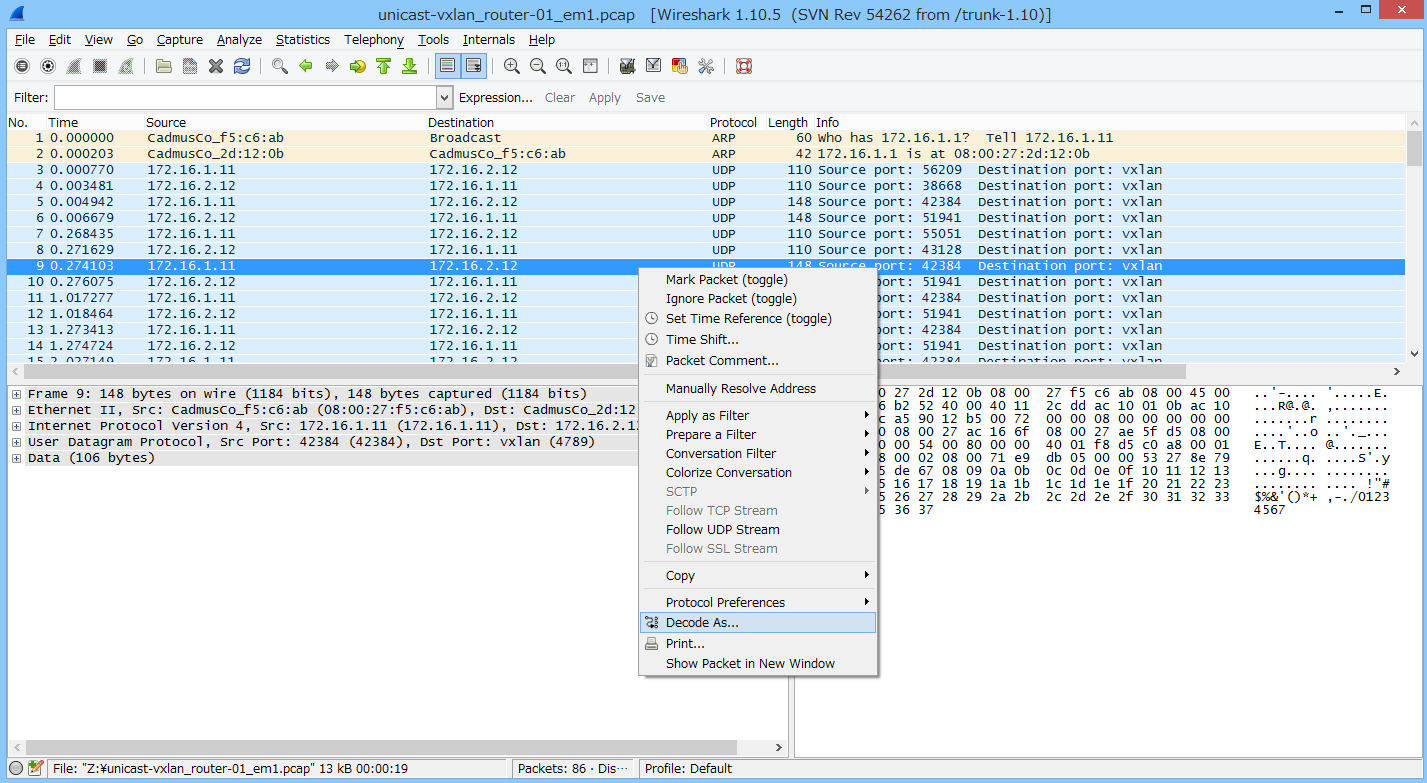
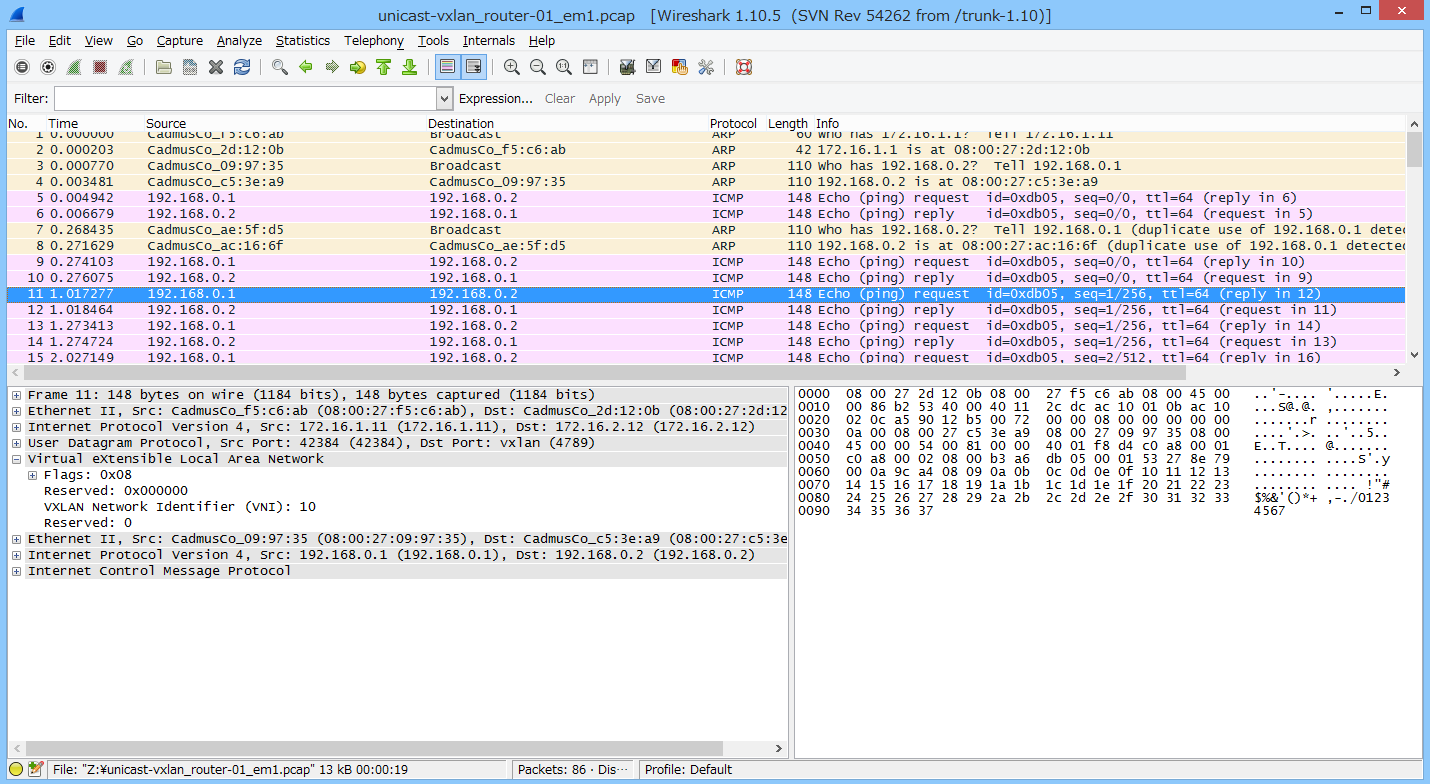
wireshark氏にお任せする。
こんな感じでデコードします。
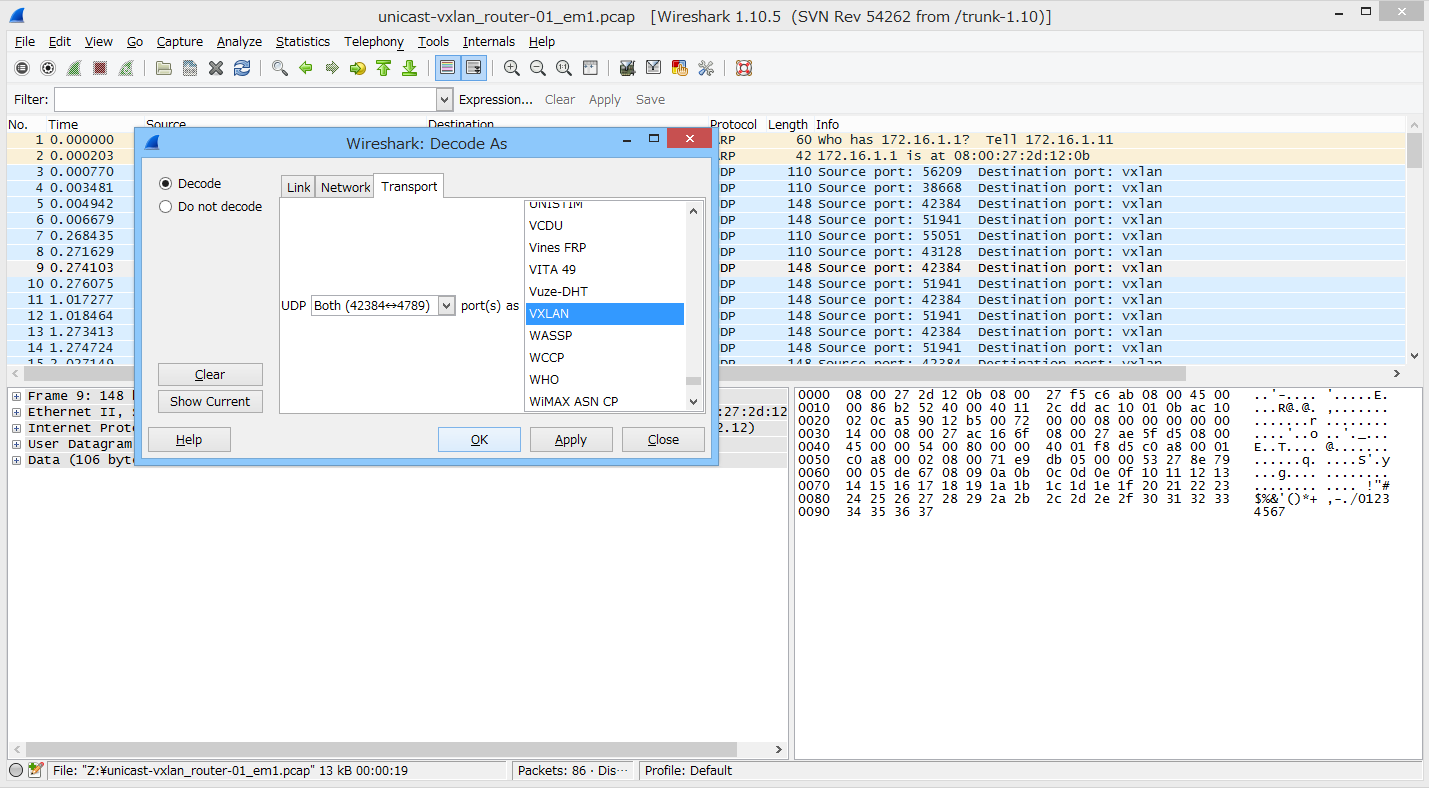
VNI=10の 192.168.0.1 <-> 192.168.0.2
VNI=20の 192.168.0.1 <-> 192.168.0.2
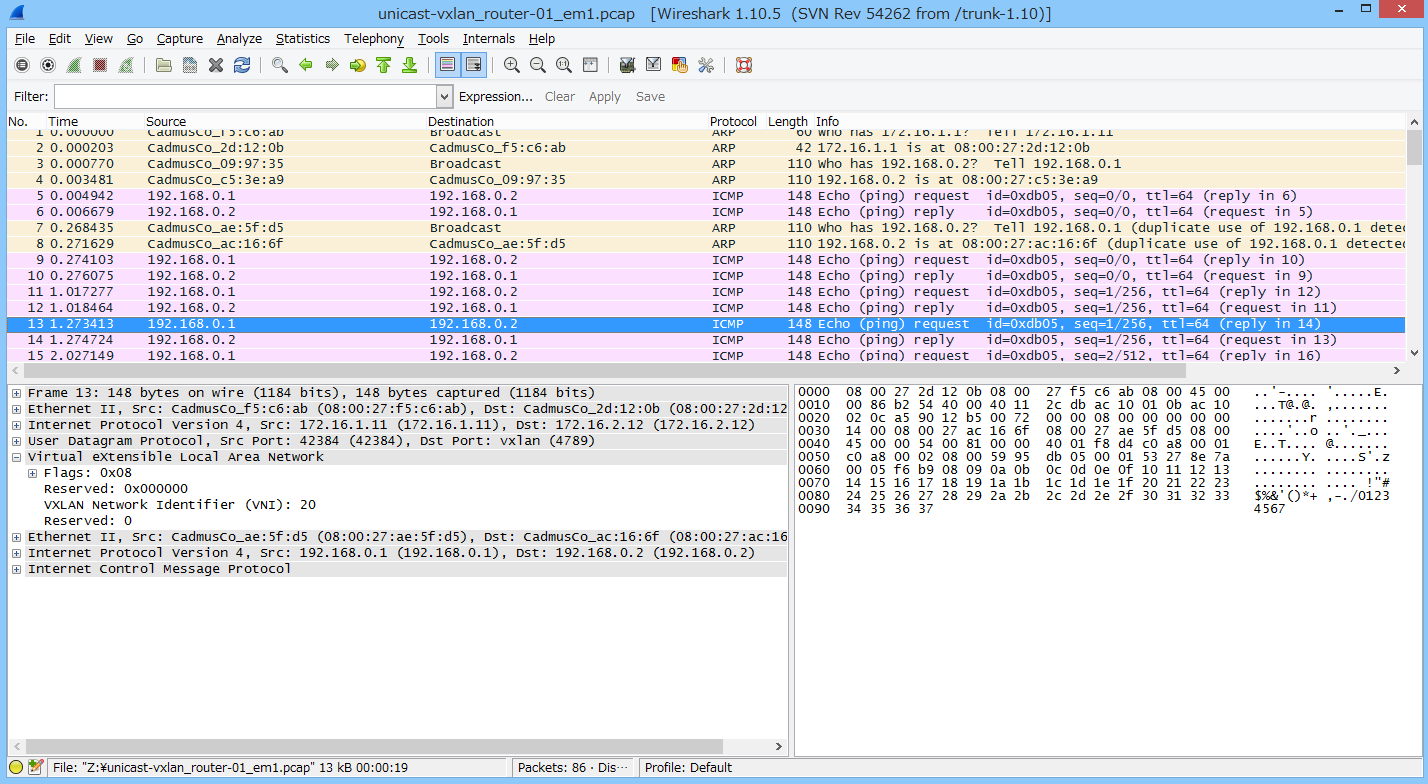
はい、うまいことIsolationされました。
マジでただのL2 over L3トンネル動かしましたってだけやで。
ちなみに、今回取得したpcapファイルはこちらです。 : https://www.ainoniwa.net/data/pcap/unicast-vxlan_router-01_em1.pcap